
Project archive guide. Technical instructions are awaiting hardware-team review; consult the documentation for your exact equipment.
Basic Soldering Guide
Soldering is a fundamental aspect of drone assembly, ensuring secure electrical connections between key components such as motors, ESCs, and flight controllers. This guide provides technical steps to help you achieve clean, consistent, and durable solder joints.
Tools and Materials
Soldering Iron
Use a 30–60W soldering iron with a fine tip for precision and proper heat control.
Rosin-Core Solder
60/40 tin/lead solder with rosin core ensures clean, conductive joints.
Flux
Improves solder flow, removes oxidation, and creates cleaner, stronger connections.
Tip Cleaner & Stand
Keep the iron tip clean with a brass sponge or damp pad, and rest it safely in a stand.
Helping Hands / PCB Holder
Stabilize your components while soldering for improved control and accuracy.
Wire Cutters & Tweezers
Trim and position wires easily with precision tools.
Desoldering Tools
Use a desoldering pump or braid to clean up or fix connections.
Heat Shrink & Tape
Protect solder joints and insulate exposed wires after the job is done.
Safety Glasses
Shield your eyes from solder splashes or flying debris during trimming.
Safety Tips
Work in a Ventilated Area
Soldering produces fumes — always work in a well-ventilated space or use a fume extractor.
Secure Your Workspace
Use a heat-resistant mat and secure your workpieces with clamps or helping hands to prevent slips.
Unplug When Not in Use
Never leave a hot soldering iron unattended. Always unplug it when finished or stepping away.
Avoid Inhaling Smoke
Rosin-core solder releases smoke that can irritate lungs — avoid hovering directly over your work.
Wear Eye Protection
Use safety glasses to protect against solder splashes, clipped wires, or unexpected movement.
Keep Flammables Away
Store paper, plastic, or isopropyl alcohol away from the soldering area to reduce fire risk.
Wash Hands After
Lead-based solder contains toxic materials. Always wash your hands after handling solder or flux.
Soldering Basics
Prepare Your Workspace
Work in a clean, well-lit, and ventilated area. Use a heat-resistant surface and secure your components with helping hands or clamps.
- Use a fume extractor or fan to move solder smoke away from your face.
- Keep all flammable items away from the work area.
- Make sure your soldering iron is stable and placed in a proper stand.
Tin the Iron Tip
Before you begin, apply a small amount of solder to the iron tip. This improves heat transfer and protects the tip from oxidation.
- Wipe the tip with a brass sponge or damp cloth before and after tinning.
- Keep the tip shiny and clean throughout your soldering session.
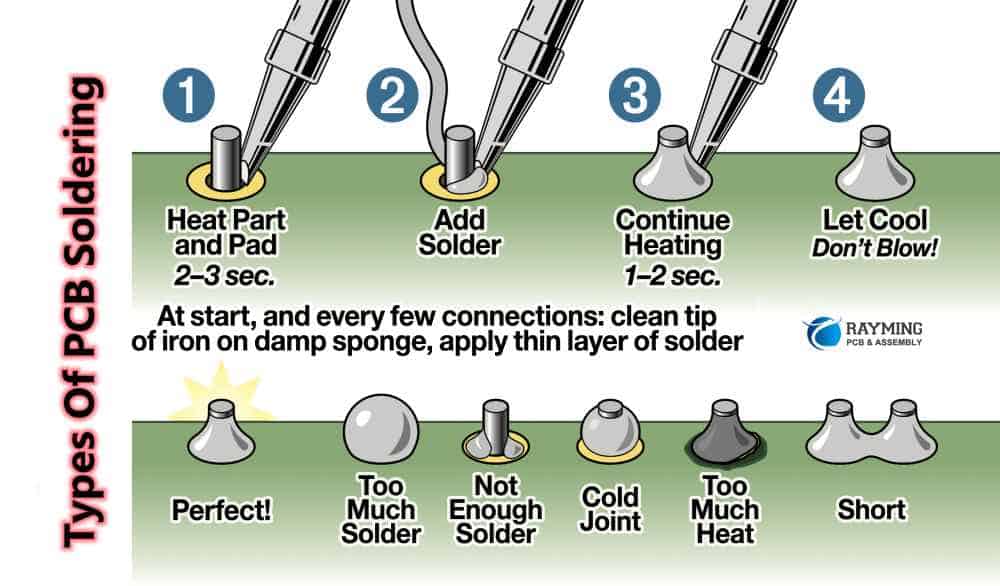
Tin the Wire or Pad
Apply a small amount of solder to the exposed wire or PCB pad before joining. This helps the final solder connection flow smoothly.
- Heat the wire/pad with the iron, then feed solder into it (not directly onto the iron).
- Don't overheat the pad — a second or two of contact is usually enough.
Solder the Joint
Join the pre-tinned wire and pad by pressing them together, then applying the soldering iron until the solder flows to form a clean connection.
- Remove the iron while holding the joint still for a few seconds to let it cool.
- A good joint is shiny, smooth, and slightly conical in shape.
Clean and Inspect
Once the connection is cool, inspect it for cold joints, bridging, or excess solder. Rework any joints that look dull, uneven, or unstable.
- Clean flux residue if necessary (especially if using external flux).
- Use magnification to double-check tight spaces and pin headers.
Safety Tips & Common Mistakes
Work in a Ventilated Area
Soldering produces fumes — always work in a well-ventilated space or use a fume extractor.
Secure Your Workspace
Use a heat-resistant mat and secure your workpieces with clamps or helping hands to prevent slips.
Unplug When Not in Use
Never leave a hot soldering iron unattended. Always unplug it when finished or stepping away.
Avoid Inhaling Smoke
Rosin-core solder releases smoke that can irritate lungs — avoid hovering directly over your work.
Wear Eye Protection
Use safety glasses to protect against solder splashes, clipped wires, or unexpected movement.
Keep Flammables Away
Store paper, plastic, or isopropyl alcohol away from the soldering area to reduce fire risk.
Wash Hands After
Lead-based solder contains toxic materials. Always wash your hands after handling solder or flux.
Avoid Cold Joints
Cold joints look dull or cracked and result from poor heat transfer. Always let the solder flow fully.
Don’t Use Too Much Solder
Excess solder can bridge connections or hide faults. Use just enough to form a smooth, shiny joint.
Prevent Pad Lift
Overheating a solder pad can detach it from the PCB. Apply heat briefly and only when needed.
Double-Check Polarity
Always verify wire orientation and labels before soldering power or motor wires to avoid damage.
Don’t Move While Cooling
Hold the joint still as it cools to avoid cracked or unreliable connections.